
Tutorial Section
All you need to know and learn upon subscribing to our VPN. Just take time to read each detail and find the right answer for your questions.
TUTORIAL ON HOW TO SET-UP VPN ON ANDROIDMOBILE
STEP BY STEP TUTORIAL:
1. Make sure you have acquired a sim of your preference based on the promo list below. If your sim card is new, activate it first via balance inquiry then go to your nearest loading station and load for your preferred promo. Use up allthe free mb included on your new sim before applying for a promo.
2. Download iWorkz VPN app in play store or on the Download Section.
3. Once installed, update the app to the latest version
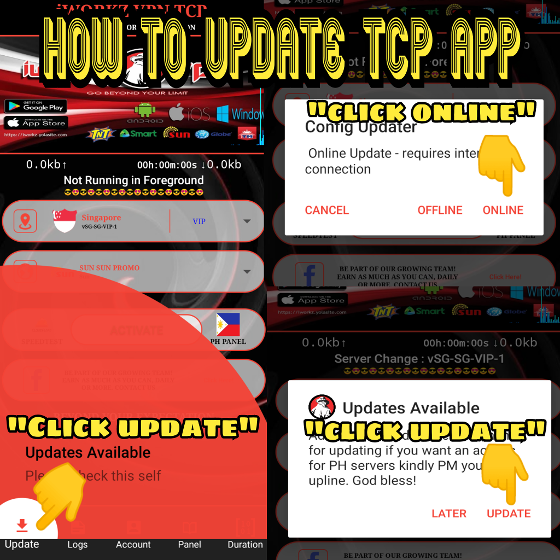
* HOW TO UPDATE: Open iWorkz vpn App, tap update, wait to confirm if there is available update, if there is choose online. The app will restart and will be ready for use.
4. Once all four (4) steps has been done, inform your upline for the generation of your username/password.
5. On the iWorkz VPN app, input username/pass and use the settings instructed by your upline.
For new users, you will be given two (2) hours free trial prior to subscribing to test the signal of your sim in your area. Once you are happy with its performance, just inform your upline for the continuance of your subscription.
YOU'RE GOOD TO GO, ENJOY!
How to claim and register FREE STORIES/GAMES in GIGALIFE app
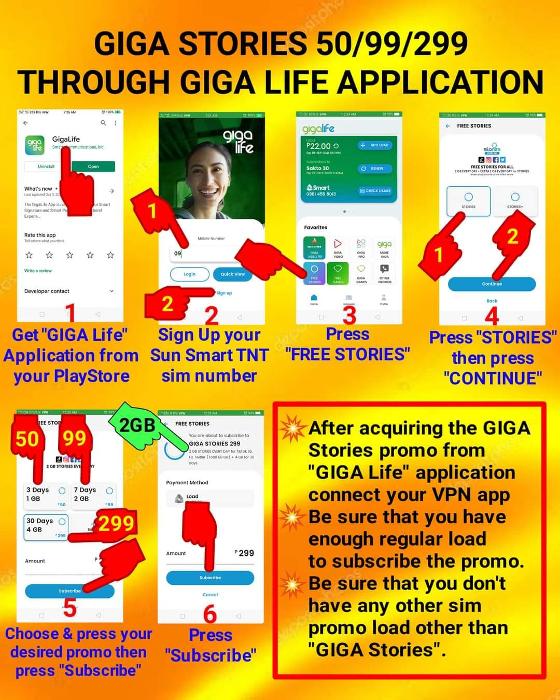
For actual video guide kindly direct message your upline.
What is iWorkz VPN Account?
The ACCOUNT is simply the username and password or credential that you can use to connect to our PREMIUM, VIP & PRIVATE servers. An account has a DURATION measured in Days/Hours/Minutes.
TYPES OF ACCOUNTS
1. PREMIUM Account
2. VIP Account
3. PRIVATE Account
ANO ANG KAIBAHAN NG PRIVATE, VIP SA PREMIUM:
1. Mas mabilis ang mga PRIVATE/VIP servers.
2. Kung PRIVATE ang account, onti lng ang users at walang congestion kaya ramdam ang bilis.
3. PRIVATE/ VIP has low ping Gaming Servers
4. PREMIUM servers are only good for streaming and browsing but it depends sa area mo kung malakas signal pde ka nadin makapag gaming.
5. PRIVATE account can connect to all servers (All access pass)
🔰NEW LOAD PROMOS🔰
⛔SMART/TNT/SUN⛔
📶GIGASTORIES50
📶GIGAGAMES50
📌2GB data everyday
📌Plus 1GB data free
📌Valid for 3 days
📌50 Pesos
❌NO BLOCKING❌
📶GIGASTORIES99
📶GIGAGAMES99
📌2GB data everyday
📌Plus 2GB data free
📌Valid for 7 days
📌99 Pesos
❌NO BLOCKING❌
📶GIGASTORIES299
📶GIGAGAMES299
📌2GB data everyday
📌Plus 4GB data free
📌Valid for 30 days
📌299 Pesos
❌NO BLOCKING❌
📶ML10 & FB10
📌200MB data everyday
📌Valid for 3 days
📌10 Pesos
✅WITH BLOCKING ✅
⛔FOR GLOBE/TM⛔
📶 GLOBE AT HOME HOMEWATCH199
📌 6GB consumable data plus 4gb per day (total 34gb)
📌Valid for 7days
📌199 Pesos
❌NO BLOCKING❌
📶FB10 & ML10
📌1GB consumable data
📌Valid for 3 days
📌10 Pesos
❌NO BLOCKING❌
📶GOSURF50 or EZ50
📌1GB consumable data plus 1gb daily (total 4gb)
📌Valid for 3days
📌50 Pesos
❌NO BLOCKING❌
📶GOSAKTO90 or EZ90
📌2GB consumable data plus 1gb daily (total 10gb)
📌Valid for 7days
📌90 Pesos
❌NO BLOCKING❌
📶GLOBE/TM NO NEED LOAD
📌UNLIMITED
📌Valid for 30days
📌VPN account only No need Load
❌NO BLOCKING❌
[ ] VPN ACCOUNTS
• PREMIUM - 100
• VIP - 200
• PRIVATE - 250
[ ] WITH PH SERVER ADD 50 PESOS
[ ] GLOBE/TM NO NEED LOAD - 220
HOW TO INSTALL VPN IN YOUR iOS DEVICE
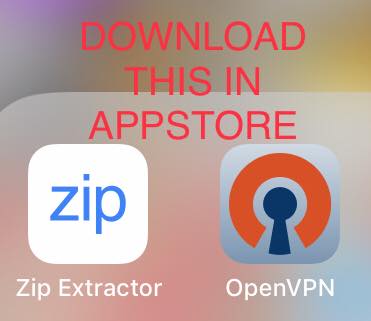
- Download the required applications in Appstore
- Download iOS config (this will be given by your upline or you can download it directly here from our Download Center
- Extract the ios config zip using Zip extractor app
- Now launch OpenVPN app tap the + symbol then click on file, locate the extracted ios config and select server depending on your subscription and network example Premium user must select any of the SUN or GTM premium.ovpn. Once highlighted click on import
- Enter your username and check "save password" then enter your password (this will be given by your upline)
- Click Add
- Make sure you have working sim with promo (What promo will you use will be given by your upline) NOTE: If new suncellular sim make sure to use the free mb just watch fb videos to use it up. before subscribing to a TU promo and connecting to vpn app
- Toggle the switch to connect
- Once connected successfully then you are good to go. :)
iWorkz VPN PC APP (HOW TO INSTALL AND CONNECT)
⚠Common errors when connecting VPN.
NOTE: For BLUE and RED PRO after installing it from playstore and every update must exit the app first using the exit prompt from the app and make sure close all recent appsthen relaunch the app again to avoid connection problems.
⚠Basic troubleshooting.
1. WAITING TO SERVER REPLY ERROR
✔ Expired promo.
✔ Change server.
2. UNKNOWN STATE ERROR
✔ Wrong promo configuration.
✔ Expired promo.
✔ Change server.
3. TRANSPORT ERROR
✔ Wrong promo configuration.
✔ Expired promo.
✔ Change server.
4. DISCONNECTED SUCCESSFULLY
✔ Change server.
5. AUTH FAILED/ CHECK ACCOUNT DETAILS
✔ Wrong Spelling username or password.
✔ Expired account.
✔ Don't make spacing.
6. CRASH LOG ERROR/CAUSE OF ERROR
✔ Re-open or restart VPN app.
✔ Restart phone.
7. ALWAYS CONNECTING STATUS:
✔ Weak signal status.
✔ Weak data receive.
✔ Turn on and off airplane mode.
✔ Change server.
8. CLIENT VERIFICATION FAILED
✔ Set your date and time correctly.
9. PROXY ERROR
✔ Turn on and off airplane mode.
✔ Change server.
10. OTHER VPN STARTED OR VPN STOPPED
✔ Disable power saving mode.
✔ Allow vpn to run in background.
Reminder: Make sure your VPN app is always up to date...
TROUBLESHOOT PART 2
1. Every 1GB(warning zone) / iwas block ng sim
- 2gb(danger zone) maximum
Per day para iwas block ng sim
💦disconnect vpn
💦off data
💦airplane mode for 10 seconds
💦re open ulit then log in
Mag si refresh na po kau nyan para iwas block ng sim
2. BAWAL PO ITONG MGA TO:
⛔no to dual log in
⛔no to dual promo
⛔no to hotspot
⛔no to sharing log in's
Pag matigas ulo ?
Auto block kau kay admin
3. Pag AUTHENTICATION FAILED
⚫ make sure na tama und id at pw
Case sensitive yan kaya paki check
⚫ pag tama naman , do an online
Update , ibig sabihin may bagong
Version ung app kaya di kayo
Makalog in
⚫paano mag update?
1. Click updates
2. online
3. Apply now
Then mag rerefresh ung app , re
Log in ho!
Note: every update , malamang
Dapat naka CONNECT ka sa vpn
⚫ if ayaw mag connect try mo
PALTAN YUNG SERVER AND PAYLOAD/NETWORK SETTINGS
📛 AYAW MAG CONNECT NG iWORKZ VPN KO ANONG PWEDE KONG GAWIN?
1. Ayaw mag connect / loading lang
▶try mo muna mag balance bago
Mag panic
( baka expire na load mo) for sun/smart/tnt dial *121# for Globe/TM you can dial *143# or text DATA BAL send to 8080
▶bawal dual promo mga bessy lalo pag bagong sim ubusin ang free mb
▶ palitan mo ung server kahit alin dun
2. CHECK MO UNG SIGNAL
⛔ kung nagawa mo na ung steps
Check mo ung signal
ang VPN APP ay dumidepende sa signal
⛔ Maghanap po tayo ng area na
Makakasagap ng connection na 4G/LTE or 3G/H+
⛔ Check mo din baka nablock ka na kaya di ka makaconnect (for sun/tnt/smart)
⛔ text DATA BAL send to 8080 tignan kung meron pang mb pag zero na maghintay ng 12am kusang babalik yan for GAMES99 promos Globe/TM
3. NO PROCESS RUNNING?
AYAW MACLICK?
WALANG OPTION SA SERVER?
🚩 close mo lahat ng app
🚩 restart ng phone
🚩 then open mo ulit ung app then check mo
🚩 Make sure lageng mag check kung updated ang app para walang aberya.
4. AYAW TALAGA?
last 2 options!
a. CLEAR DATA NYO SI iWORKZ VPN
b. OPEN SETTINGS>APPS>LOOK FOR iWORKZ APP>CLEAR DATA
c. OPEN iWORKZ APP THEN UPDATE ULIT!
d. HAYAHAY NA
5. PAG AYAW PADIN?!! ETO NA TALAGA!!
🔰 UNINSTALL AT INSTALL MO ULIT UNG
APP DOWNLOAD SA PLAYSTORE/DOWNLOAD SECTION
🔰 PAKI UPDATE
🔰 SAME LOG IN AT PW
THEN CONNECT
6. LAST PART
✔ iinform naman ho kayo
Kung may prob ba ung network
, maintenance o inauupdate ung app so kalma mga sir/mam
_________
⭕ Kung games ang gagawin mo?
- select VIP/PRIVATE > any singapore servers or PH server
note:
For vip/private clients only
⭕ Kung NETFLIX/iWanTV ang gagawin mo?
- select VIP/PRIVATE > choose PH server
note:
For vip/private clients only
PAKI TRY MUNA LAHAT NG
TROUBLESHOOT, THEN
EVERY ERROR PAKI SCREEN SHOT
PO NG MAKITA NAMEN ..
SALAMAT , PAKI BASA PO NG MAIGI
WAG YUNG KONTING KIBOT/ERROR IPPM AGAD KAME!
TAKE NOTE GUYS:
NAPAKA DAME NYO
PARA IPM NAMEN LAHAT
YOU SHOULD KNOW AT LEAST KUNG PAANO
MAG TROUBLES SA END NYO!
ANJAN NA LAHAT NG POSSIBILITIES NA ERROR, PLS DO SO! TNX
- Uninstall your current .net framework and Download .net framework 3.5
- Download iWorkz PC APP in our download section
- Extract file using WinRAR or CLICK HERE and choose the appropriate file for your PC/laptop
- x86 for 32bit system and x64 for 64bit system
- Run ang iWorkz vpn application mula sa folder
-
Install , next next then check all 3 boxes and finish lng. Pagkatapos ay iupdate agad ang app then ilogin na ang iyong account.
KUNIN ANG TAMANG DETAILS SA IYONG UPLINE/RESELLER DAHIL MAARING MAGBAGO ANG SETTINGS NITO FROM TIME TO TIME DEPENDE SA ATING UPDATES
PINDUTIN ANG UPDATE BUTTON KAPAG NAG ERROR NO INTERNET CONNECTION ULITIN AT HINTAYIN. KAPAG AYAW PADIN MAUPDATE PLS. ADVISE YOUR RESELLER AT WAIT NATIN ANG DIRECT DOWNLOAD LINK NG UPDATED VERSION.
BASIC TROUBLESHOOT: BASAHIN PONG MABUTI
GUSTO MO BA NG ILANG TIPS OR MGA INFORMATION NA KAILANGAN MONG MALAMAN?